
I think it's too soon to compare Remote Help with a tool like TeamViewer because the Remote Help feature with Microsoft Intune just went on GA this week. I was looking at this option for quite a while and finally got time to test and write about it. Remote Help BenefitsRemote Help License RequirementsNetwork ConsiderationsConfigure … Continue reading Intune Remote Help to the Rescue
Tag: Entra
How To Map a Shared Drive Using Microsoft Endpoint Manager Instead of GPOs

Welcome to another MEM how to article. Among Microsoft Endpoint Manager's wonderful capabilities I see this as a big win towards promoting it's modern device management capabilities. This will simply supersede the local AD, OUs and GPMC that used to manage drive mappings to user sessions. Update [03 Sep 2022] Microsoft have recently announced the … Continue reading How To Map a Shared Drive Using Microsoft Endpoint Manager Instead of GPOs
How To Create and Usages of Microsoft Endpoint Manager (MEM) Device Filters

MEM device filters finally came out of preview to General Availability (GA) and lets see why we need to use device filters. What Device Filters Does? This helps the Endpoint Manager policies to apply in a more targeted manner. This feature is similar to the setting up targeted GPO assignments or probably GPO loopback processing. … Continue reading How To Create and Usages of Microsoft Endpoint Manager (MEM) Device Filters
Two Ways To Enable Hybrid AAD Join Mode For A Controlled Deployment

When you planning (of course you are!) to bring the local AD joined Windows workstations to Microsoft Endpoint Manager/ Intune, one of the first things you need to complete is a Pilot/ controlled deployment to understand the end result, Hybrid AAD Joined state's features and what options will be opened for you to test and … Continue reading Two Ways To Enable Hybrid AAD Join Mode For A Controlled Deployment
How to use Microsoft Graph and Power Automate to Automate Teams Creation With a Template
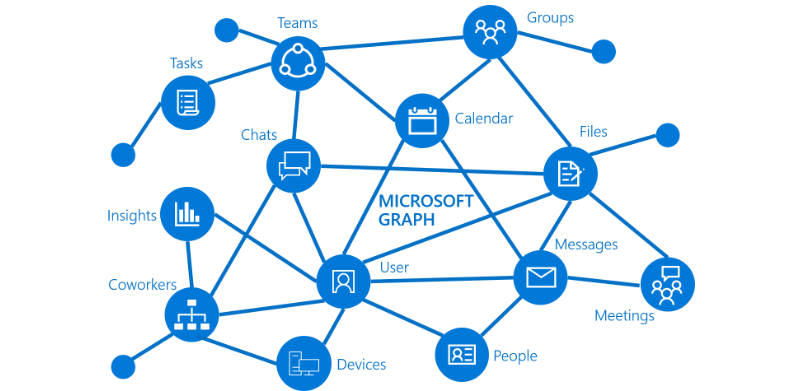
Often the issue with the IT Admins is with the ever-growing Teams popularity, how to beat the demand and how to create Teams and especially, how to template it out and automate it. Well, Teams templates are now in the Teams Admin Center where you can see pre-defined templates and the ability to create custom … Continue reading How to use Microsoft Graph and Power Automate to Automate Teams Creation With a Template
How to Onboard Windows Devices to Microsoft Defender for Endpoint
To start hunting for threats and act on alerts, first the devices in the organisation must be onboarded to MDE. There are few onboarding methods that suites the organisation and I will be showcasing the steps of the commonly used setups. I will be focusing on Windows 10 devices in this article. And finally the … Continue reading How to Onboard Windows Devices to Microsoft Defender for Endpoint
How to configure Microsoft Defender for Endpoint Advanced Features
In my previous article we saw how to enable roles and provide RBAC to specific groups. In this article I will explore on how to enable the advanced features in MDE so it will be on “God Mode” as I like to put it and start intergrate with other systems like Microsoft Endpoint Manager etc. … Continue reading How to configure Microsoft Defender for Endpoint Advanced Features
Manage Continues Access Evaluation behaviour via Conditional Access Polices

When I first had a play with CAE for the 1st time, I wrote about on the importance of this setting and how to enable it in your environment. Please check the previous article below. https://shehanperera.com/2021/07/10/aad-cae/ Microsoft recently announced the same CAE control will be available via Conditional Access Policies and can be setup per … Continue reading Manage Continues Access Evaluation behaviour via Conditional Access Polices
Microsoft Endpoint Manager Shared Multi-User Device Profiles

In this article, I'm planning on uncovering a configuration profile in MEM which is known as the Shared Multi-User Device Profiles. These profiles can be used and applied to the devices in the fleet which will be used by many users periodically and does not require to retain the data in the disk and have … Continue reading Microsoft Endpoint Manager Shared Multi-User Device Profiles
Azure AD Hidden Gems. Azure AD Temporary Access Pass

Temporary Access Pass or TAP, is a cool Azure AD feature which is still in Preview, but I see huge wins if Microsoft put this in to general availability so that the IT admins can provide uninterupted security over user accounts. In real life, users may forget to bring the mobile phone to office or … Continue reading Azure AD Hidden Gems. Azure AD Temporary Access Pass
How to Assign Admin Roles to Azure AD Groups with Access Reviews and Just in Time Access?

As of July 31 2021, this feature in Generally Available and was notified in the M365 Admin Center with the message MC274516 This approach is how you assign roles to Azure AD Groups along with the Privileged Identity Management features Just in Time access and Access Reviews options. Previous setup If you need to assign … Continue reading How to Assign Admin Roles to Azure AD Groups with Access Reviews and Just in Time Access?
How to analyze Conditional Access Policies with ‘Report Only’ Mode?
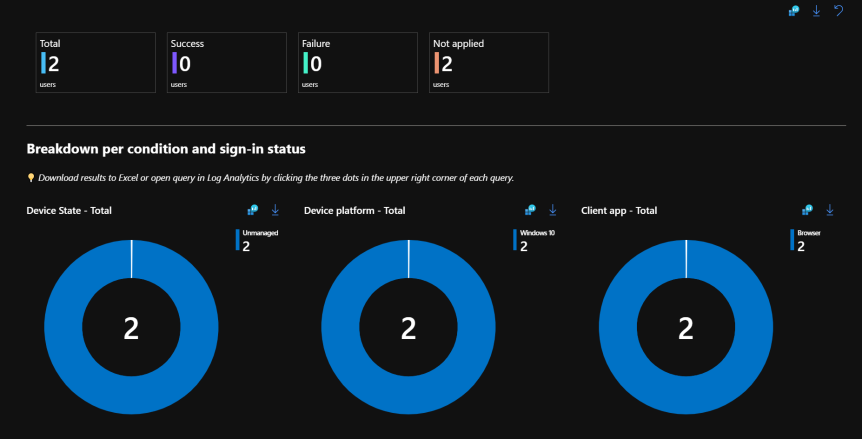
Conditional Access Polices can be setup in 3 main modes. On/ Off/ Report Only. On and Off modes are self explanatory where "Report Only" mode needs additional work. This post will go in detail on how to use the Report Only mode before you actually switch to ON. Read more about Conditional Access Policies https://shehanperera.com/2022/05/03/aad-cap101/ … Continue reading How to analyze Conditional Access Policies with ‘Report Only’ Mode?
Why Azure AD Continues Access Evaluation is Important?
Continues Access Evaluation or CAE is still in preview, but it has proven to refresh the near-real time refresh for Conditional Access Policies. Ideally this is a very helpful feature in the world of Identity and Access Management, because there are frequent attacks happening and the IdAM Admins need to take action quickly. Some actions … Continue reading Why Azure AD Continues Access Evaluation is Important?
Automate Cross Tenant Resource Access With Azure AD Entitlement Management

With the Azure AD Identity Governance feature "Entitle Management" it is easier to automate the access requests, set expiry dates, justify why a user needs access and get the load out of the IT admins. Azure B2B collaboration is a hot topic these days and the end result should be stresses access from the end … Continue reading Automate Cross Tenant Resource Access With Azure AD Entitlement Management
3 Ways to Enforce Azure AD MFA Registration in Azure AD/ M365 Tenant

Requirement of having MFA on Azure AD accounts are top priority at the moment and basically it has become a basic requirement. There are couple of ways to enable MFA on to user accounts by default. This can make sure all users are protected without having t o run periodic reports etc. Reason for collation … Continue reading 3 Ways to Enforce Azure AD MFA Registration in Azure AD/ M365 Tenant
Cool and a Powerful feature to stop bulk accidental/ intentional deletion exports in an Azure AD Hybrid Environment

This is a hidden gem for Azure AD Sync connect configurations and I was looking for a feature like this for sometime now. Noticed this was available while trying to perform a migration of the tool to anew server and when reviewing the new confit before commuting. There can be many reasons for this kind … Continue reading Cool and a Powerful feature to stop bulk accidental/ intentional deletion exports in an Azure AD Hybrid Environment
Azure MFA Authentication Loop Fix
Issue: Office 365 Web apps users (SharePoint Online, Office.com, OWA etc.) will receive the MFA prompt every time after opening the browser.Ideally the browser should honor the “Stay signed in?” messages when there are no session lifetime settings configured.When the user click Yes, the persistent browser cookie will get saved and work for 90 days. … Continue reading Azure MFA Authentication Loop Fix
Effective use of Azure AD Administrative Units [Azure AD AUs]
![Effective use of Azure AD Administrative Units [Azure AD AUs]](https://emsroute.com/wp-content/uploads/2020/12/blog.jpg?w=863&h=0&crop=1)
I look at the Azure AD portal with curiosity to see what are the new features and then want to play around with them to better understand it’s usage. This is not a latest feature, but it’s out of the preview mode and this is me writing the effective use of Azure AD AUs. How … Continue reading Effective use of Azure AD Administrative Units [Azure AD AUs]
How to federate Google (Gmail) accounts with Azure AD to access resources without a Microsoft account

My DIY project for this weekend is to try and implement a method to set Google as an identity provider for Azure AD resource access requirements. If someone can access apps or services on a different platform without having to create an account of the resource owner's end, that makes lives more easier and simply … Continue reading How to federate Google (Gmail) accounts with Azure AD to access resources without a Microsoft account
Microsoft 365 Groups Cheat Sheet

This is my compilation of the something out of everything you need to know about the M365 Groups. Over the course of time Microsoft brought different types of groups to manage users and computers. In all those scenarios, the group was capable of performing one task or 2 maximum.Act as a Security Group or an … Continue reading Microsoft 365 Groups Cheat Sheet
 EMS Route