In this section, I would like to discuss one of MDE's important set of settings and how to set these up. Namely ASRs rules or Attarck Surface Reduction rules. As the name implies, it helps closes any security holes in the device. Some notes on ASR rules to keep in handy Device COmpatibility Windows 10 … Continue reading How to Configure Attack Surface Reduction (ASR) Rules using Microsoft Intune
Author: Shehan Perera
I’m a self driven and passionate individual about Windows Server management, Cloud strategies, Azure, Microsoft 365, Exchange Server, Microsoft Teamwork, Microsoft Infrastructure technologies, ITIL standards, end user support and a passion for troubleshooting.
I strongly believe my skills in different layers in IT Infrastructure during the last 10 years has immensely helped me to become the person I am today and I embrace it and loving every second of it.
How to use Microsoft Graph and Power Automate to Automate Teams Creation With a Template
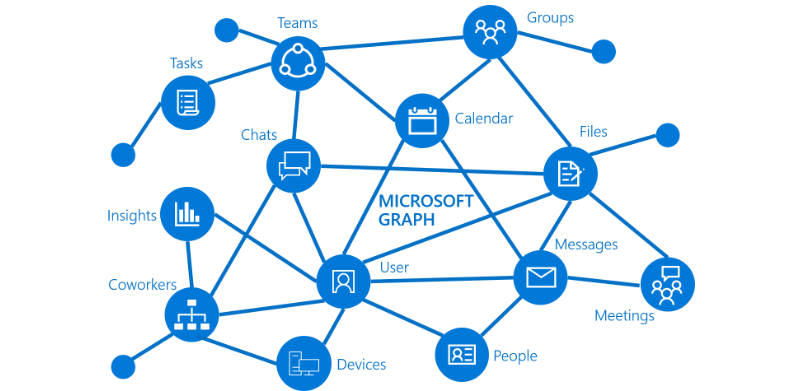
Often the issue with the IT Admins is with the ever-growing Teams popularity, how to beat the demand and how to create Teams and especially, how to template it out and automate it. Well, Teams templates are now in the Teams Admin Center where you can see pre-defined templates and the ability to create custom … Continue reading How to use Microsoft Graph and Power Automate to Automate Teams Creation With a Template
I’ve completed the MDE Ninja Training and it was great! (my thoughts and experience)
It took me sometime, but finally completed the MDE Ninja training. I got to know about this course from a local user group meetup and it hit me. This certificate is not a standard Microsoft certificate, but I would say more of an achievement celebration from Microsoft for the effort we put to learn the … Continue reading I’ve completed the MDE Ninja Training and it was great! (my thoughts and experience)
How to Onboard Windows Devices to Microsoft Defender for Endpoint
To start hunting for threats and act on alerts, first the devices in the organisation must be onboarded to MDE. There are few onboarding methods that suites the organisation and I will be showcasing the steps of the commonly used setups. I will be focusing on Windows 10 devices in this article. And finally the … Continue reading How to Onboard Windows Devices to Microsoft Defender for Endpoint
How to configure Microsoft Defender for Endpoint Advanced Features
In my previous article we saw how to enable roles and provide RBAC to specific groups. In this article I will explore on how to enable the advanced features in MDE so it will be on “God Mode” as I like to put it and start intergrate with other systems like Microsoft Endpoint Manager etc. … Continue reading How to configure Microsoft Defender for Endpoint Advanced Features
Security Microsoft Defender for Endpoint Roles and Device Group Access
In this article of the Defender series, I would like to discuss about the MDE RBAC to reflect the least access principal. This will cover the Roles for MDE and Device Group Access As you may know the Least Privileged Access principal is in play for MDE as for any other M365/ Azure resource. Defining … Continue reading Security Microsoft Defender for Endpoint Roles and Device Group Access
Introduction to Microsoft Defender for Endpoint
To make things simpler I will be calling this as MDE. Of course that the industry level acronym for Defender for Endpoint. In an age where security is the very soul of the tech industry and basically any industry, Microsoft Defender is the champion as it’s built with the latest and greatest. MDE is not … Continue reading Introduction to Microsoft Defender for Endpoint
Manage Continues Access Evaluation behaviour via Conditional Access Polices
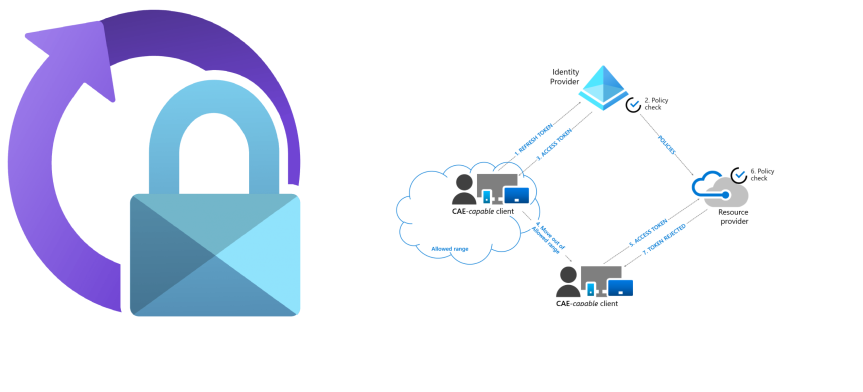
When I first had a play with CAE for the 1st time, I wrote about on the importance of this setting and how to enable it in your environment. Please check the previous article below. https://shehanperera.com/2021/07/10/aad-cae/ Microsoft recently announced the same CAE control will be available via Conditional Access Policies and can be setup per … Continue reading Manage Continues Access Evaluation behaviour via Conditional Access Polices
Microsoft Endpoint Manager Shared Multi-User Device Profiles

In this article, I'm planning on uncovering a configuration profile in MEM which is known as the Shared Multi-User Device Profiles. These profiles can be used and applied to the devices in the fleet which will be used by many users periodically and does not require to retain the data in the disk and have … Continue reading Microsoft Endpoint Manager Shared Multi-User Device Profiles
Azure AD Break Glass Account: What to consider when creating one and how to monitor sign ins

With the growing threats around the world everyday, bad actors are targeting Microsoft 365 ecosystem like never before. Attacks are taking place everyday and if and when they have breached in, their end goal is to go for the "keys to the kingdom". Usually its just the end of the story when they get them. … Continue reading Azure AD Break Glass Account: What to consider when creating one and how to monitor sign ins
Azure AD Hidden Gems. Azure AD Temporary Access Pass

Temporary Access Pass or TAP, is a cool Azure AD feature which is still in Preview, but I see huge wins if Microsoft put this in to general availability so that the IT admins can provide uninterupted security over user accounts. In real life, users may forget to bring the mobile phone to office or … Continue reading Azure AD Hidden Gems. Azure AD Temporary Access Pass
My blog is now among the top 100 Azure blogs

My blog https://shehanperera.com was selected to be among the top 100 Azure blogs. This is a great honor and a motivational boost to keep doing what I’m doing and share my knowledge about the technology. I would like to thank FeedSpot for the consideration. Please check https://blog.feedspot.com/microsoft_azure_blogs/ for the listed blogs. Thank you and Keep … Continue reading My blog is now among the top 100 Azure blogs
Another Reason Why The AVD Session Hosts Are Failing To Load FSLogix User Profiles

Azure Files plays a big role in the Azure Virtual Desktop depolyments and for FSLogix to work in the intended way, the storage account needs to be joined to the domain. It can be either extending the on-premises domain to Azure by setting up a domain controller in the respective region or by setting up … Continue reading Another Reason Why The AVD Session Hosts Are Failing To Load FSLogix User Profiles
FIX: Windows 2019 CIS Benchmark Image Stopping the Azure VM Becoming the NTP Server After Transferring the PDC Emulator
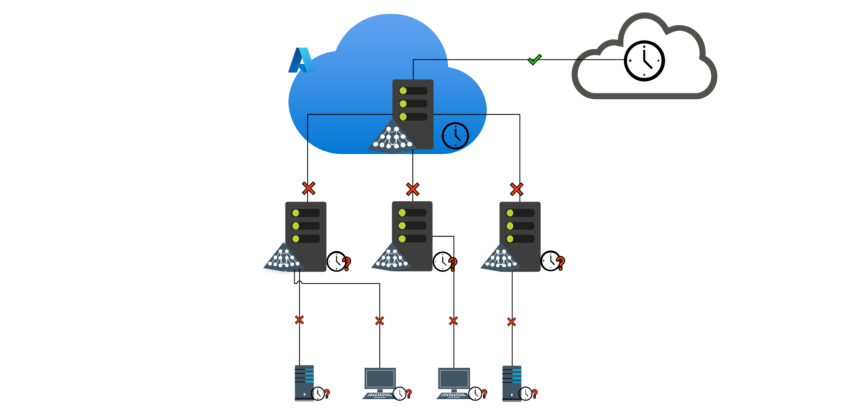
In a Windows Domain environment the time is always working in a hierarchical manner. Server that holds the PDC emulator role holds the NTP Server and the other DCs will sync time from it and the members will sync time from those domain controllers. At times you have to change the FSMO Roles to a … Continue reading FIX: Windows 2019 CIS Benchmark Image Stopping the Azure VM Becoming the NTP Server After Transferring the PDC Emulator
How to Assign Admin Roles to Azure AD Groups with Access Reviews and Just in Time Access?

As of July 31 2021, this feature in Generally Available and was notified in the M365 Admin Center with the message MC274516 This approach is how you assign roles to Azure AD Groups along with the Privileged Identity Management features Just in Time access and Access Reviews options. Previous setup If you need to assign … Continue reading How to Assign Admin Roles to Azure AD Groups with Access Reviews and Just in Time Access?
So I created My 1st Power Automate Flow To Send Personalized Reminders To Teams

First of all I must say that I'm not a hardcore developer. If an expert see this, I'm sure they will find many points that needs improvement. You are welcome to comment and point out any issues in this or any improvements.Still a Power Platform novice and a citizen developer :) And I'm sure there … Continue reading So I created My 1st Power Automate Flow To Send Personalized Reminders To Teams
How to analyze Conditional Access Policies with ‘Report Only’ Mode?
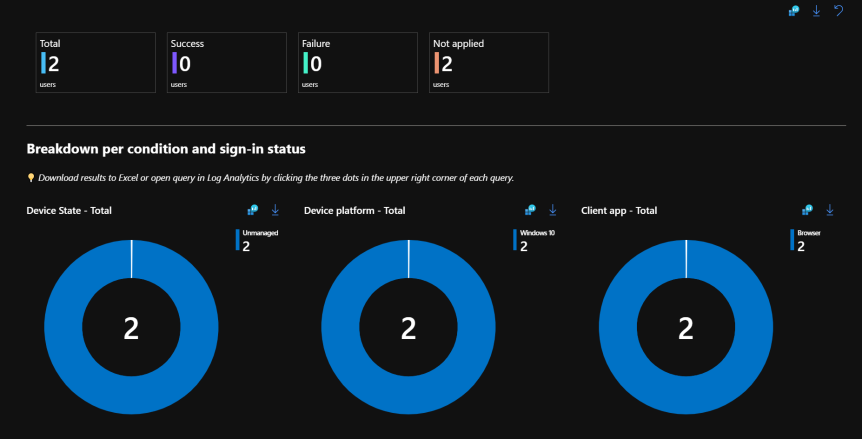
Conditional Access Polices can be setup in 3 main modes. On/ Off/ Report Only. On and Off modes are self explanatory where "Report Only" mode needs additional work. This post will go in detail on how to use the Report Only mode before you actually switch to ON. Read more about Conditional Access Policies https://shehanperera.com/2022/05/03/aad-cap101/ … Continue reading How to analyze Conditional Access Policies with ‘Report Only’ Mode?
Why Azure AD Continues Access Evaluation is Important?
Continues Access Evaluation or CAE is still in preview, but it has proven to refresh the near-real time refresh for Conditional Access Policies. Ideally this is a very helpful feature in the world of Identity and Access Management, because there are frequent attacks happening and the IdAM Admins need to take action quickly. Some actions … Continue reading Why Azure AD Continues Access Evaluation is Important?
Azure Automate Hybrid Worker Groups to Automate On-Premises Workloads

While Azure Automate can run PowerShell and Python scripts to make the cloud workloads to automate I like to focus on the PowerShell side of things. With PowerShell, you have the ability to connect to connect to modules like Exchange Online, MSOL, Azure AD, Az Storage and etc. Similar to that you can use the … Continue reading Azure Automate Hybrid Worker Groups to Automate On-Premises Workloads
Automate Cross Tenant Resource Access With Azure AD Entitlement Management

With the Azure AD Identity Governance feature "Entitle Management" it is easier to automate the access requests, set expiry dates, justify why a user needs access and get the load out of the IT admins. Azure B2B collaboration is a hot topic these days and the end result should be stresses access from the end … Continue reading Automate Cross Tenant Resource Access With Azure AD Entitlement Management
 EMS Route