
What else can be a great feature in Microsoft Endpoint Manager other than bundling up all the policies and create that "Golden Image" type policy and assign it to the Device or User groups so from an Administrators perspective, you don't need to individually assign groups in to policies and apps and managing this will … Continue reading Pros and Cons of Using Microsoft Endpoint Manager Policy Sets Feature
Tag: Modern Workplace
How to Migrate Group Policies to Microsoft Endpoint Manager using Group Policy Analytics

Hello again. Today I'm writing about the MEM Group Policy Analytics feature which is still in preview, and how you can inspect your local GPOs and migrate them to MEM. Why you ask? Organizations whether the are big or small, if they are managed by Active Directory domain service, chances are there are Group Policies … Continue reading How to Migrate Group Policies to Microsoft Endpoint Manager using Group Policy Analytics
How to Use KQL and Azure Log Analytics to Inspect Azure AD Sign-in Logs?

As you may already know KQL has become the standard for querying large data sets in Azure Log Analytics space. When you have thousands of users who are in Azure AD and when you have MFA and other Conditional Access Policies setup, next thing you will see is tons of sign in logs, activity logs, … Continue reading How to Use KQL and Azure Log Analytics to Inspect Azure AD Sign-in Logs?
How to Easily Configure Google Chrome Policies via Microsoft Endpoint Manager?

I would say this is a long time coming and Admins can take a bit of a rest without looking for the Google Chrome ADMX files and updating the custom OMA-URI content whenever the ADMX updates.The good news is Microsoft Endpoint Manager has the relevant Google Chrome policy settings within the portal! This is a … Continue reading How to Easily Configure Google Chrome Policies via Microsoft Endpoint Manager?
Intune Remote Help to the Rescue

I think it's too soon to compare Remote Help with a tool like TeamViewer because the Remote Help feature with Microsoft Intune just went on GA this week. I was looking at this option for quite a while and finally got time to test and write about it. Remote Help BenefitsRemote Help License RequirementsNetwork ConsiderationsConfigure … Continue reading Intune Remote Help to the Rescue
How To Map a Shared Drive Using Microsoft Endpoint Manager Instead of GPOs

Welcome to another MEM how to article. Among Microsoft Endpoint Manager's wonderful capabilities I see this as a big win towards promoting it's modern device management capabilities. This will simply supersede the local AD, OUs and GPMC that used to manage drive mappings to user sessions. Update [03 Sep 2022] Microsoft have recently announced the … Continue reading How To Map a Shared Drive Using Microsoft Endpoint Manager Instead of GPOs
How To Set Defender For Endpoint To Work In Parallel When Defender Is Not The Primary A/V In The Workstation/ Server
EDR in Block Mode EDR stands for Endpoint Detection and Response. MDE has the capability to work in parallel to the 3rd party A/V running in the device. While this will not provide 100% of the tasks done by an A/V which includes real-time protection, it will help to report malicious activities.Because there is a … Continue reading How To Set Defender For Endpoint To Work In Parallel When Defender Is Not The Primary A/V In The Workstation/ Server
Two Ways To Enable Hybrid AAD Join Mode For A Controlled Deployment

When you planning (of course you are!) to bring the local AD joined Windows workstations to Microsoft Endpoint Manager/ Intune, one of the first things you need to complete is a Pilot/ controlled deployment to understand the end result, Hybrid AAD Joined state's features and what options will be opened for you to test and … Continue reading Two Ways To Enable Hybrid AAD Join Mode For A Controlled Deployment
How to Onboard Windows Devices to Microsoft Defender for Endpoint
To start hunting for threats and act on alerts, first the devices in the organisation must be onboarded to MDE. There are few onboarding methods that suites the organisation and I will be showcasing the steps of the commonly used setups. I will be focusing on Windows 10 devices in this article. And finally the … Continue reading How to Onboard Windows Devices to Microsoft Defender for Endpoint
Azure AD Hidden Gems. Azure AD Temporary Access Pass

Temporary Access Pass or TAP, is a cool Azure AD feature which is still in Preview, but I see huge wins if Microsoft put this in to general availability so that the IT admins can provide uninterupted security over user accounts. In real life, users may forget to bring the mobile phone to office or … Continue reading Azure AD Hidden Gems. Azure AD Temporary Access Pass
Another Reason Why The AVD Session Hosts Are Failing To Load FSLogix User Profiles

Azure Files plays a big role in the Azure Virtual Desktop depolyments and for FSLogix to work in the intended way, the storage account needs to be joined to the domain. It can be either extending the on-premises domain to Azure by setting up a domain controller in the respective region or by setting up … Continue reading Another Reason Why The AVD Session Hosts Are Failing To Load FSLogix User Profiles
How to analyze Conditional Access Policies with ‘Report Only’ Mode?
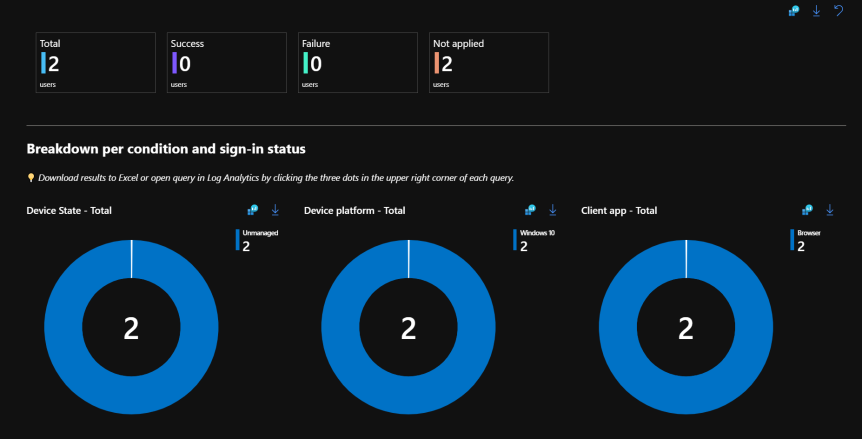
Conditional Access Polices can be setup in 3 main modes. On/ Off/ Report Only. On and Off modes are self explanatory where "Report Only" mode needs additional work. This post will go in detail on how to use the Report Only mode before you actually switch to ON. Read more about Conditional Access Policies https://shehanperera.com/2022/05/03/aad-cap101/ … Continue reading How to analyze Conditional Access Policies with ‘Report Only’ Mode?
Edge Browser Apps – A simple solution for managing multiple Outlook accounts for Teams meetings and multiple Teams sessions!

With the current upraise of Teams usage for collaboration meetings have been simplified and gone up to the next level of features. However, Microsoft still haven't addressed the use case where users having multiple Mailboxes in Outlook added with delegation permissions (Shared mailboxes or User mailboxes) and to use the specific account's Teams features when … Continue reading Edge Browser Apps – A simple solution for managing multiple Outlook accounts for Teams meetings and multiple Teams sessions!
Microsoft 365 Groups Cheat Sheet

This is my compilation of the something out of everything you need to know about the M365 Groups. Over the course of time Microsoft brought different types of groups to manage users and computers. In all those scenarios, the group was capable of performing one task or 2 maximum.Act as a Security Group or an … Continue reading Microsoft 365 Groups Cheat Sheet
Preparing workstations for the Cloud Journey with Hybrid Azure AD Join

In almost all the cases, the organization is not in a position to get away from the local domain as its tightly connected with other services that are running on-premises and maintaining the on-premises identity is vital. Further, you have the on-premises domain and the workstations are joined to it, GPOs being pushed across and … Continue reading Preparing workstations for the Cloud Journey with Hybrid Azure AD Join
Stop MS Teams Auto Starting

Teams installation with no auto start switch has issues in many levels where it’s not honoring the switch. Even though it installs and won’t auto launch for the first time, when the user logs off and log back in, it auto launches and creating the below registry key in the HKEY User hive. Location: Computer\HKEY_CURRENT_USER\SOFTWARE\Microsoft\Windows\CurrentVersion\Run String … Continue reading Stop MS Teams Auto Starting
 EMS Route