With this post, I'm focussing anyone who is keen on knowing more about advanced features of MDE and how to get into that realm of threat hunting, and what are the controls available. So you have proper licensing enabled, and you have Microsoft Defender for Endpoint on your users' devices and they are onboarded to … Continue reading Microsoft 365 Defender – Advanced Threat Hunting Basics
Author: Shehan Perera
I’m a self driven and passionate individual about Windows Server management, Cloud strategies, Azure, Microsoft 365, Exchange Server, Microsoft Teamwork, Microsoft Infrastructure technologies, ITIL standards, end user support and a passion for troubleshooting.
I strongly believe my skills in different layers in IT Infrastructure during the last 10 years has immensely helped me to become the person I am today and I embrace it and loving every second of it.
An Attempt to Configure Defender for Endpoint and Endpoint Manager With the Same Device Tag
Most often the device tagging requirements are simple or you do have a set of tags for the devices that are enrolled in Intune and a set of tags for the devices onboarded in Defender for Endpoint. However there can be situations where you need both services to have the same device tagging setup. This … Continue reading An Attempt to Configure Defender for Endpoint and Endpoint Manager With the Same Device Tag
Get Notified When You Have Group Based License Assignment Issues

I'm considered as a citizen developer and I know the ways to get some automation happening when it needed the most. This is one of them. This has been in my head for a while and I've seen this happening many times. SO thought to do some findings, playing around with the tools to come … Continue reading Get Notified When You Have Group Based License Assignment Issues
Web Content Filtering with Microsoft Defender for Endpoint Advanced Features
I recently realised I haven't done much writing on Microsoft Endpoint Manager (MDE) side of things for a while. Web Content Filtering via MDE is a straight forward implementation and this will work on the devices that are onboarded currently. MDE has a lot of good features that makes it a next level XDR and … Continue reading Web Content Filtering with Microsoft Defender for Endpoint Advanced Features
Microsoft Entra – An Overview
Woke up to a nice little surprise from Microsoft this morning. Microsoft Entra. At first glance It looked like they have bundled the Identity and Access related products in to one portal and provides access via https://entra.microsoft.com According to Microsoft, this is a single pane of view for all Identity and Access related solutions, which … Continue reading Microsoft Entra – An Overview
Use Conditional Access Policies to Securely Register Security Information for MFA and SSPR
Hello there! This week I thought I will write one more article on Conditional Access Policies. As you know setting up an access policy is easy and it is basically mandatory to have one or more polices now, but you may have internal polices where anyone who is registering for MFA must do that in … Continue reading Use Conditional Access Policies to Securely Register Security Information for MFA and SSPR
How to use Log Analytics on Endpoint Manager

Ever since I learned about KQL I'm obsessed about it and what it can do in Azure Log Analytics space and this is my attempt on plugging another service to Log Analytics to experiment with the logs. KQL has proven to be a clever tool when it comes to dig deeper in to Log Analytics. … Continue reading How to use Log Analytics on Endpoint Manager
How to Setup Endpoint Manager RBAC

Welcome to another MEM article. Today I'm going to talk about an essential component of Microsoft Endpoint Manager where a lot of admins ignore or fail to configure. As your team grows or if you planning on outsourcing tasks to a different team of admins, a MSP perhaps, it is vital to configure correct RBAC … Continue reading How to Setup Endpoint Manager RBAC
FIX and Thoughts on Autopilot Pre-Provision Error 0x80180014
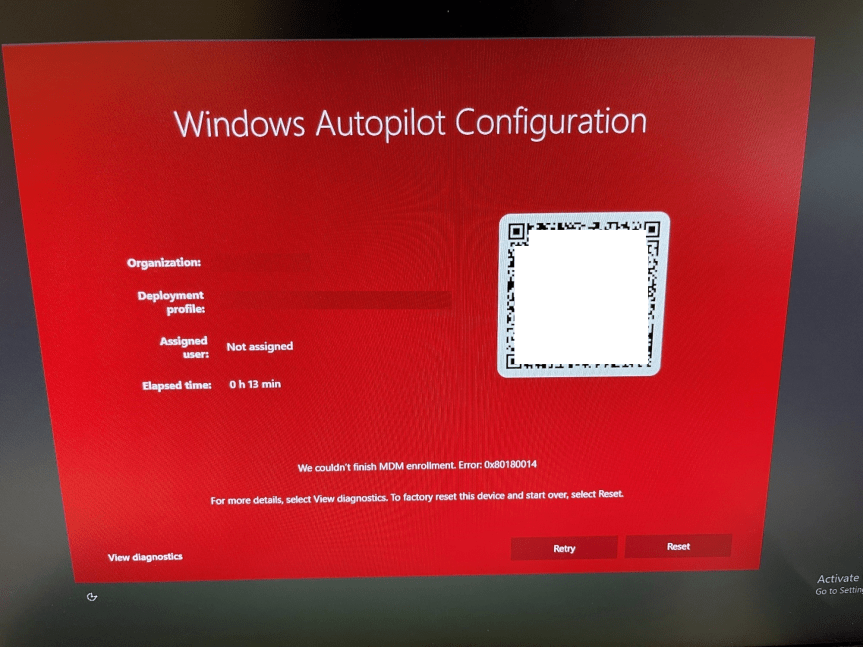
It was one of days where you get these sort of errors just after completing a task. That big ol' unsatisfying red screen with an error. This time it was We couldn't finish MDM enrollment. Error 0x80180014 At 1st glance, though the Reset button will fix the issue. However it didn't. It resets the machine … Continue reading FIX and Thoughts on Autopilot Pre-Provision Error 0x80180014
Azure AD Conditional Access Policies 101

By now anyone who is in the industry, looking at Azure AD daily basis and who are thinking about how to implement Zero-Trust know what are Conditional Access Policies (CAPs). Anyone who is new to the Azure AD Premium benefits and starting out, must be wondering what are CAPs and how to config one. I'm … Continue reading Azure AD Conditional Access Policies 101
Pros and Cons of Using Microsoft Endpoint Manager Policy Sets Feature

What else can be a great feature in Microsoft Endpoint Manager other than bundling up all the policies and create that "Golden Image" type policy and assign it to the Device or User groups so from an Administrators perspective, you don't need to individually assign groups in to policies and apps and managing this will … Continue reading Pros and Cons of Using Microsoft Endpoint Manager Policy Sets Feature
How to Migrate Group Policies to Microsoft Endpoint Manager using Group Policy Analytics

Hello again. Today I'm writing about the MEM Group Policy Analytics feature which is still in preview, and how you can inspect your local GPOs and migrate them to MEM. Why you ask? Organizations whether the are big or small, if they are managed by Active Directory domain service, chances are there are Group Policies … Continue reading How to Migrate Group Policies to Microsoft Endpoint Manager using Group Policy Analytics
How to Use KQL and Azure Log Analytics to Inspect Azure AD Sign-in Logs?

As you may already know KQL has become the standard for querying large data sets in Azure Log Analytics space. When you have thousands of users who are in Azure AD and when you have MFA and other Conditional Access Policies setup, next thing you will see is tons of sign in logs, activity logs, … Continue reading How to Use KQL and Azure Log Analytics to Inspect Azure AD Sign-in Logs?
How to Easily Configure Google Chrome Policies via Microsoft Endpoint Manager?

I would say this is a long time coming and Admins can take a bit of a rest without looking for the Google Chrome ADMX files and updating the custom OMA-URI content whenever the ADMX updates.The good news is Microsoft Endpoint Manager has the relevant Google Chrome policy settings within the portal! This is a … Continue reading How to Easily Configure Google Chrome Policies via Microsoft Endpoint Manager?
Microsoft Defender for Identity – Install and Configure Sensors (Azure ATP Sensors)

I will cut to the chase. MDI or Microsoft Defender for Identity is a great tool for identifying Identity threats in the local AD environment. Once the sensor is setup, you can monitor for the behavior and have the ability to configure in a way so that the bad actors aren't able to compromise your … Continue reading Microsoft Defender for Identity – Install and Configure Sensors (Azure ATP Sensors)
Intune Remote Help to the Rescue

I think it's too soon to compare Remote Help with a tool like TeamViewer because the Remote Help feature with Microsoft Intune just went on GA this week. I was looking at this option for quite a while and finally got time to test and write about it. Remote Help BenefitsRemote Help License RequirementsNetwork ConsiderationsConfigure … Continue reading Intune Remote Help to the Rescue
How To Map a Shared Drive Using Microsoft Endpoint Manager Instead of GPOs

Welcome to another MEM how to article. Among Microsoft Endpoint Manager's wonderful capabilities I see this as a big win towards promoting it's modern device management capabilities. This will simply supersede the local AD, OUs and GPMC that used to manage drive mappings to user sessions. Update [03 Sep 2022] Microsoft have recently announced the … Continue reading How To Map a Shared Drive Using Microsoft Endpoint Manager Instead of GPOs
How To Create and Usages of Microsoft Endpoint Manager (MEM) Device Filters

MEM device filters finally came out of preview to General Availability (GA) and lets see why we need to use device filters. What Device Filters Does? This helps the Endpoint Manager policies to apply in a more targeted manner. This feature is similar to the setting up targeted GPO assignments or probably GPO loopback processing. … Continue reading How To Create and Usages of Microsoft Endpoint Manager (MEM) Device Filters
How To Set Defender For Endpoint To Work In Parallel When Defender Is Not The Primary A/V In The Workstation/ Server
EDR in Block Mode EDR stands for Endpoint Detection and Response. MDE has the capability to work in parallel to the 3rd party A/V running in the device. While this will not provide 100% of the tasks done by an A/V which includes real-time protection, it will help to report malicious activities.Because there is a … Continue reading How To Set Defender For Endpoint To Work In Parallel When Defender Is Not The Primary A/V In The Workstation/ Server
Two Ways To Enable Hybrid AAD Join Mode For A Controlled Deployment

When you planning (of course you are!) to bring the local AD joined Windows workstations to Microsoft Endpoint Manager/ Intune, one of the first things you need to complete is a Pilot/ controlled deployment to understand the end result, Hybrid AAD Joined state's features and what options will be opened for you to test and … Continue reading Two Ways To Enable Hybrid AAD Join Mode For A Controlled Deployment
 EMS Route