
Not too long ago I spoke in the Adelaide Microsoft IT Pro User Group regarding Conditional Access Policies (CA policies) we all know and love. It was not a 100% technical how-to discussion as chances are you are already using this in your environment. If I break down my presentation into 3 main parts, it was basically,
- CA Policy stages and tips for each stage to uplift the posture
- CA Policy controls that can be a use case scenario in the environment when uplifting the policy posture
- What else you can achieve with the CA Policy practice
The recorded session can be found below.

What was exciting for me was talking about my findings and insights into the 3 stages of CA Policies in an organization. I can safely say that I have seen Entra configurations across the board (or at least the majority of them), from concerning to satisfying setups. But the good thing is there is always room to develop and minimize the gaps and to maintain a mature process. This should all happen with the security posture-uplifting mindset.
Three Stages at a high level before we dig into these.
- No CA Policy practice or starting out
- In the Journey
- We Have a Mature CA Policy Practice
- Policy Documentation
- Key Takeaway
Before we move on to breaking down the tasks at each level, I want to show this diagram. This is something I came up with to visualize the CA Policy practice in a better way. Being technical is only one aspect of this. Understanding your current position and moving is the other major aspect where the technical know-how will nicely complement the process.

No CA Policy practice or starting out
This is a stage where you need a lot of ground-level work to get to an acceptable policy practice. I mainly see three reasons why someone would be in this stage.
- Migrating from a different IdP (Eg: Okta)
- Haven’t considered CA Policies yet
- Security practice is not that great and stale procedures
⚡Define a baseline
Right off the bat, there are policies you can implement to gatekeep your identity environment. Blocking Legacy Authentication is a major one. These starter levels and other important policies are now available as templates. You can easily adopt them in your environment.
Best to enable them in the Report-Only mode or apply to a PILOT user set to analyze the impact. Once that’s verified, you can enable it to all users or the desired users.
⚡CA Policy RBAC setup
Make sure you set the RBAC from the get-go. Conditional Access Policy Administrator is the least privileged access that you can provide to your team.
⚡ Naming convention
If you have some policies and not a clean process of identifying the policy behaviour (yes, I have seen this!), planning for a meaningful naming convention is important. Make sure the policy name will give you a glimpse of what’s happening inside the policy itself.
Eg:
GRANT-GEO-BLOCKING-ALL-USERS
BLOCK-DEVICE-COMPLIANCE-ALL-USERS
BLOCK-LEGACY-AUTH-ALL-USERS
GRANT-RBAC-STRONG-AUTH
⚡Prioritize key applications
This is a good chance to understand the applications. Chances are you are not able to apply CA Policies to all of your applications. Some applications may not be registered in Entra yet. Plan out what needs to go first depending on the criticality and apply the policies.
⚡Set up policies for Admin privileges
Rather than applying CA Policies to user groups, you can select the “Directory roles” option as an assignment and any RBAC user will need to go through the defined CA Policy.
⚡Implement MFA for all users using CA Policies
This is very important as MFA is now being handled by CA Policies and you need to get the users inside the policy. If you are using Security Defaults, you may have seen the options are limited and it’s for the Free tier tenants. As you grow your Identity estate, you need rich features that support the security. Also, Per-User MFA is not in use at the moment. I will leave that there. If you are migrating from another IdP, make sure you are following the migration process to get them into Entra ID.
⚡Monitor and review access
Since you are starting out from scratch or starting to put some rigor into the CA Policies, it is important to monitor and review access to make sure your BLOCK and GRANT actions are covering the desired identities.
⚡Build a CA policy roadmap
It’s not possible to implement all the required policies overnight. Understanding the identities, what they perform, and what risks you need to mitigate should be considered when implementing the policies. Building a roadmap will give that peace of mind.
Above are some of my key tips when you are starting out, you need to think about the roadmap and expected outcomes and adhere to the best practices.
In the Journey
Once you start working on the above key items, you will be in that CA Policy journey wanting to do more with the policies to safeguard the identities.
⚡Evaluate current policy coverage
Understanding the identities covered by the policies is essential. This will help you to further adjust the policies if needed.
⚡Audit and adjust the MFA usage (use MFA gap analyzer)
Ideally, all the identities should be covered with CA Policy-based MFA. However, there can be scenarios where you haven’t included all of them. Or, have excluded users from the policy to test or troubleshoot issues but never included them back. That needs to be checked and fixed as a part of the journey. Microsoft Learn document with the steps to set up a Log Analytics workbook is one of the easiest ways to verify this. But you need to stream your logs to Azure 1st and they will be used in the workbooks.
🔗 https://learn.microsoft.com/en-us/entra/identity/monitoring-health/workbook-mfa-gaps
⚡If you have Entra ID Premium P2, plan for Risk Based Policies (Defender for Identity integration)
Risk-based CA Policies are useful to understand the behavior of the identities. Also, Defender for Identity integration will send more risk-based signals to Entra to be able to use them in CA Policies and make sure there are no Sign-in Risks and User Risks.
🔗 https://learn.microsoft.com/en-us/entra/id-protection/concept-identity-protection-policies
⚡Look at implementing Authentication Contexts
This is a neat feature where you can connect different elements to CA Policies. I have explained one scenario below. That will give you a good understanding of the feature.
🔗 https://emsroute.com/2023/03/15/how-to-use-auth-context-on-pim-01/
⚡Plan for compliance-based policies
A CA Policy can do many things and not just be used for MFA. Verify the device compliance is one of the benefits. The Compliance Signals coming into the CA Policy will decide if the user can access the organization’s resources or not. This is best for a couple of reasons.
- When you need to allow BYOD
- When you need to allow users from other tenants to access your organization’s resources
- When a user requires a PIM elevation
- To connect to Global Secure Access options
⚡Policy gap analysis
It’s ideal to perform this quarterly or annually to make sure you have all the relevant policies activated. I have seen the policies are all created but in the Off or Report-Only mode. This will not secure anything. Activating the policies needs to be done as a part of the policy creation process. While you can go through the policies to understand the policy behavior, using a workbook can give you more insights. Microsoft has a CA Policy Gap Analyser workbook that you can easily use to hook up with your Entra tenant. However you do it, this activity will help you close gaps, adjust the policies, and aid the overall policy health.
⚡Plan for guest or external users CA Policies
It is essential to secure your organizational resources from all parties (inside or outside). Cross-tenant collaboration and guest access are not new, and these collaborations are happening every day. Think about making your internal IT policies map to the CA Policies. Currently, CA Policies can be implemented for B2B Collaboration, B2B direct connect, and other types of external users. Adopting these into your policy set will help you to further strengthen the posture. The best thing is, that these policies can be connected with Compliance based, terms of use and other policies. Handy!
⚡Implement CA Policy Architecture patterns (eg: ASD Policies)
This may not be for everyone, but I have received this question from customers. Is there any standard document that outlines the CA policies that can be used which cover all aspects? Australian Signals Directorate (ASD) Secure Blueprint document is one of the best ones out there. This has a lot of good guidance and relevant information. You can refer to this document and expand on that if needed.
🔗 https://blueprint.asd.gov.au/configuration/entra-id/protection/conditional-access/policies/
We Have a Mature CA Policy Practice
For an organization to be in this maturity it needs some stuff among other things.
- Good documentation that explains the policies
- Probably SMEs who are looking after the identity landscape
- A good policy coverage – AKA “You know your CA Policies”
However, some things need to be checked to be on top of your Identity security.
⚡Review and adjust risk-based policies
As I mentioned before, add this to your CA Policy review now that you have a mature process.
⚡Use App enforcement policies – be mindful of the service dependencies!
Some applications like Exchange Online and SharePoint Online have their own Access Control settings, that can be mixed with the CA Policies. The device or user signals can be sent to those apps for further app-based controls. This is a great way to avoid unexpected dependency blockages.
Important read: https://learn.microsoft.com/en-us/entra/identity/conditional-access/service-dependencies
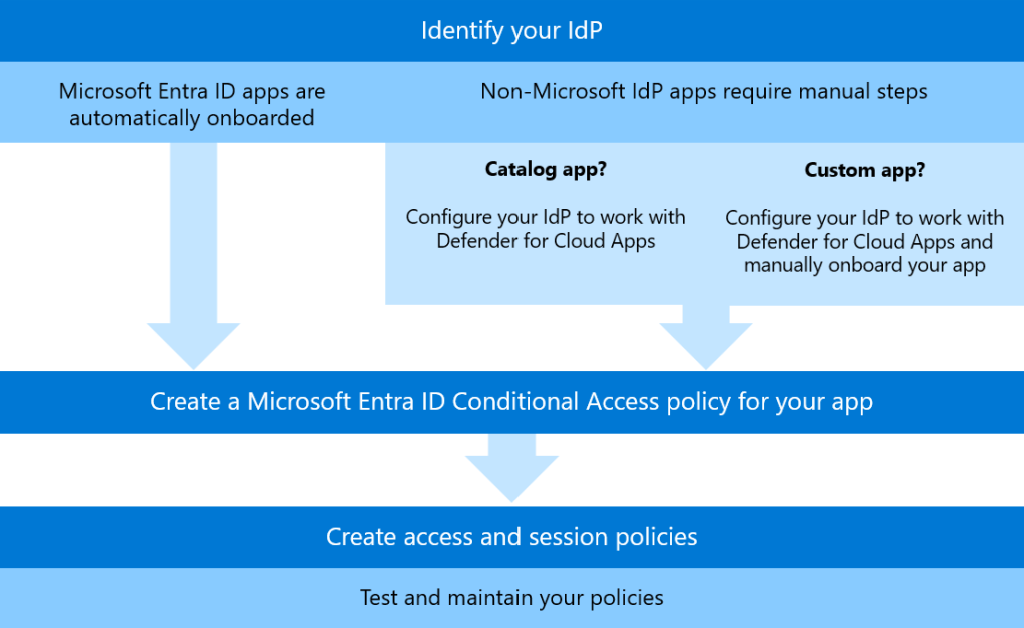
⚡Cloud app security control connections
When you have Defender for Cloud apps, you can connect that with CA Policies to control user access and user sessions.
🔗https://learn.microsoft.com/en-us/defender-cloud-apps/proxy-intro-aad
- Use access policies to:
- Block access to Salesforce for users of unmanaged devices.
- Block access to Dropbox for native clients.
- Use session policies to:
- Block downloads of sensitive files from OneDrive to unmanaged devices.
- Block uploads of malware files to SharePoint Online.
Usage flow as below
⚡Expand policy sessions for token protection
This is still in preview at the time of writing but is a much-awaited CA Policy feature. With this control set to ON, the token will be device bound which provides an additional layer of protection for the user sessions.
🔗https://learn.microsoft.com/en-us/entra/identity/conditional-access/concept-token-protection
⚡Integrate Compliance based policies
As I mentioned above, use the compliance policies and compliance signals from Entra ID to further strengthen the device’s security.
🔗https://emsroute.com/2023/10/10/compliance-partners-howto/
⚡”Terms of Use” for BYOD (if you have a BYOD practice)
Terms of Use is a great enforcement to have when you need the users to accept a certain policy or a set of conditions before accessing a critical app or organizational resources in general. Great for BYOD and External user access scenarios as well.
🔗https://learn.microsoft.com/en-us/entra/identity/conditional-access/terms-of-use
🔗https://learn.microsoft.com/en-us/entra/identity/conditional-access/policy-all-users-require-terms-of-use
⚡CA Policy Gap Analysis and Fine-tuning
Now that you have a rich policy practice, analyzing the policies, looking for any potential gaps, and fine-tuning them is a good frequent exercise to perform. This will in return aid the zero-trust movement as well.
🔗https://emsroute.com/2023/07/06/ca-policy-gap-analyzer-workbook-01/
Policy Documentation
Conditional Access Documenter tool in the IdPowerApps from Merill Fernando is awesome when you need to have a bird’s eye view of the policies and in general when you need to quickly document the policies.
🔗https://idpowertoys.merill.net/ca
Key Takeaway
Managing identities is easy if you have a rigid process and the security controls around it. Conditional Access Policies is surely one of them. While CA Policies can’t 100% take care of your identities, you must also ensure you have other controls in place. However, CA policies will certainly be a major pillar in your Zero-Trust setup. To battle the Identity threats, A mature CA Policy structure is imminent. That will most definitely gate-keep the bad actors. Those CA Policies should have the controls that go with the Entra features like Strong Auth, Auth Contexts, Compliance based, and all others as they complement the best practices when it comes to Identity and Access. Similarly, having that mindset of Continuous CA Policy Posture uplift will help you to safeguard your infrastructure as well as to maintain an overall security posture as well.
Discover more from EMS Route
Subscribe to get the latest posts sent to your email.
 EMS Route