
“We never know what that GPO really does”, and “The person who created this GPO is not in the business anymore”. Sounds familiar? Most of the businesses that have a Microsoft ecosystem and who have been using AD/ GPO for a long time always have stories to tell about the Group Policies.
This blog is not about creating another group policy, but some guidance on how to start planning to move to Intune Configuration profiles. This is one of the golden tools in Intune that can be used with the current Intune Licensing (yes, no need for the Intune Plan 2 or Inutne Suite), and can get the benefit today.
My approach to this article is to help you give guidance on how to start planning to move the GPOs and Analyse them as the first step.
The Common Issue
As I mentioned before, there are Group Policies, probably with legacy settings and they are still being applied to devices and users regardless. And it is just working. Or at least it gives no errors. Because of this situation, no one really wants to change anything in the GPOs. This has become a very common issue in businesses where no one really wants to initiate a change so ideally the GPO/s can be tested and removed if not needed. Clean-up is essential.

Microsoft Intune Configueration Policies
With the rise of Microsoft Intune and its rich feature set, it has almost made GPOs redundant and it’s just a matter of time before the decisions need to be made for that jump. And it is definitely a good jump. Not the Empire waiting for you on the other side patiently type of a jump :)

During a lot of customer engagements, I worked on that related to Microsoft Intune, one of the main questions was how can we move the GPOs to Intune. My answer every time is, do not think of it as moving, but remodeling your policies and settings in the Cloud with modern tools. If you move the policies AS IS, Intune will become another GPMC.msc soon and no one will like that. During the Group Policy Analytics steps, it shows you the Intune compatible policy settings, but you can make a decision at that stage whether you need to assign it re-create it, or just ignore it. If you need to use the same policy setting, you can migrate the setting then and there and create a new Inutue Config policy.
However, analyzing the policies is a must if you are planning on getting out of the GPO realm. And yes it is not an easy task when you have multiple AD domains and a long history of a Microsoft eco-system.
A Workflow I came up with according to my experience
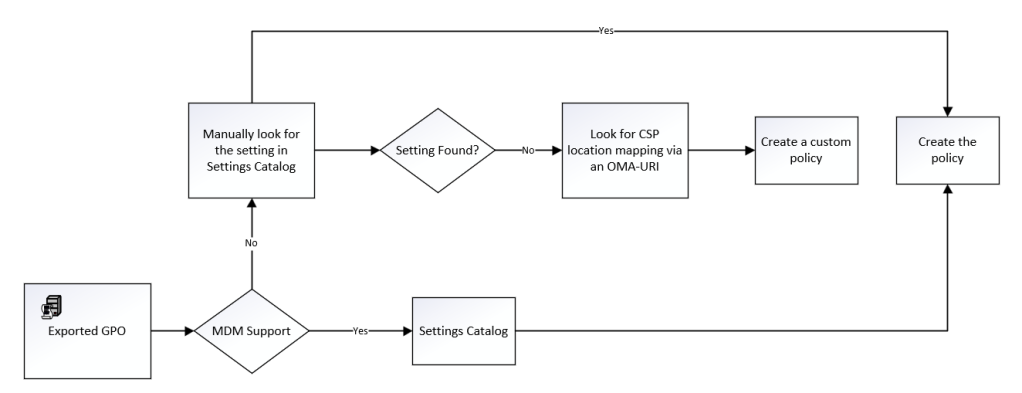
When the settings are not available in Intune
- When the settings are not available in Intune, do not panic! I have noticed if you search in the Settings Catalog using the keywords in the policy settings, you will find it. It is that the same setting name might not be available, however, it addresses the same CSP location in the device so you can accept that as a win.
Case and point
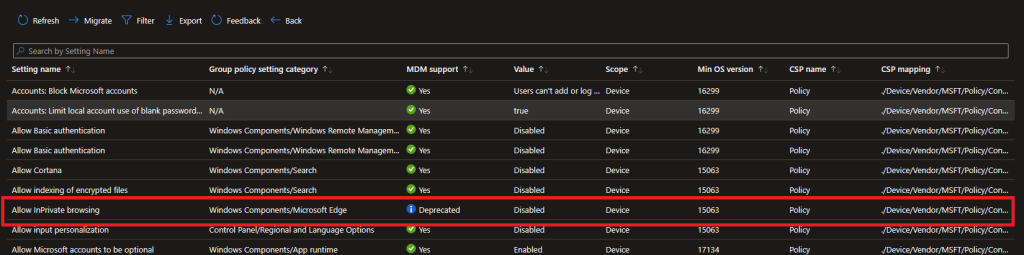
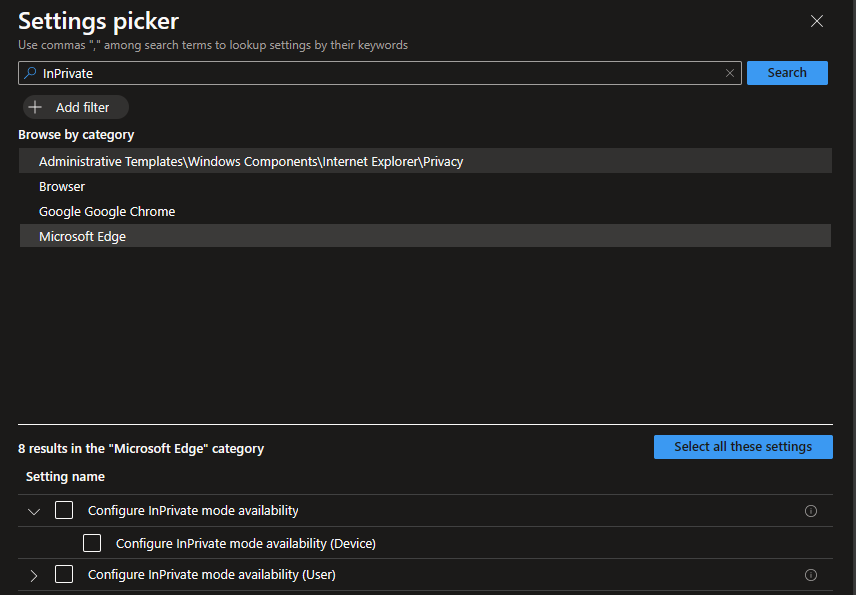
However, if I create a new Intune policy and search for InPrivate, I can see similar settings

Or if you are specifically looking for Microsoft Edge
- If the above option still giving you grief, try using an OMA-URI. These are custom settings that you can create to address the CSP locations of the device manually and not using a pre-defined policy setting in the Settings Catalog. More on targeting an OMA-URI can be found here. 🔗https://learn.microsoft.com/en-us/troubleshoot/mem/intune/device-configuration/deploy-oma-uris-to-target-csp-via-intune
Using other Config Policy Templates
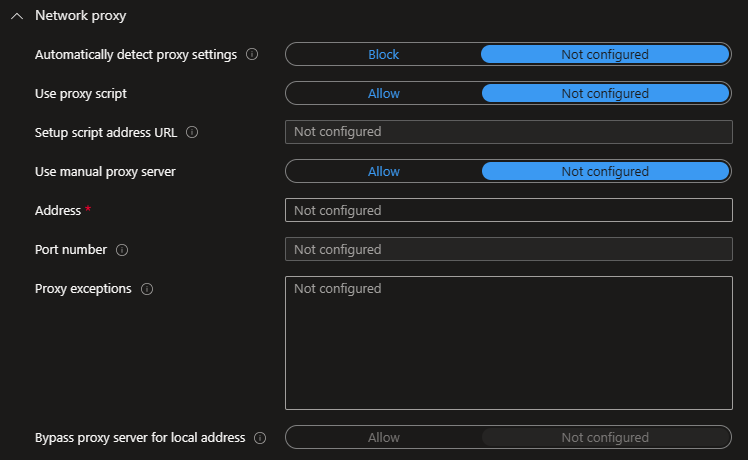
I can give you one example. If you are using any device restrictions with GPOs such as Proxy settings today, and planning on moving the policy to Intune, you can use the Device Restrictions config policy template. There is a section for Network Proxy there. In this way, you can use templates rather than going with the Settings Catalog found settings AS IS. Just a different way of looking at the settings and chances are the template settings have got new settings added so you don’t need to look for anything in the Settings Catalog.
Things to be Mindful of
- If you have other Intune config policies already deployed, make sure you don’t migrate the policy setting into Intune as that can end up with an error
- If MDM support shows as NO, chances are the policy is not Windows 10/11 compatible and created for legacy OSes.
- Always check if the policies are applying to devices or users when targeting the groups.
- If you are not sure of the Intune setting, apply it to a pilot group, but some settings may not be reverted back to default because of the settings tattooing issue.
A Successful GPO Analysis Looks Like This
Wrapping Up
GPO Analytics is an easy-to-manage and informative tool where you can easily migrate the Intune compatible settings and target the devices or uses at the same time. Remember to remove the same policy from Group Policies after migrating it to Intune so you won’t end up in errors. Good luck with the move!
Discover more from EMS Route
Subscribe to get the latest posts sent to your email.
 EMS Route
Hi Intune is good as a Windows 10/11 replacement but what about for Servers? Thanks.
LikeLike
Intune is currently designed to work with end user devices and not servers
LikeLike