
🚦Read below before you hit Allow or Block!
Have you seen this annoying little messge popping up all over Edge browser (and other Chromium based broswers) lately?
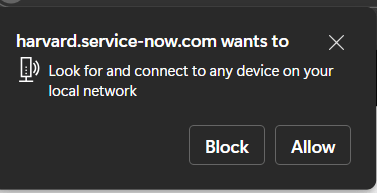
This is a recent update came into Chromium based browsers and noticed it in Edge with the Edge December 2025 update – Version 143 and in Chrome 142
🚦A New Gate Keeper
This is an additional layer that protects users and organizations and gives more control over to the IT admins to control the behaviour. Cross-site request forgery (CSRF) attacks are common these days and the bad actors are targeting routers and other devices on private networks to get into organizations, and they may use these types of tactics to fingerprint the local network.
✅If Allowed?
Simply, this gives websites the ability to connect to your local network or simply to the user’s computer if that’s running any servers or services. An example like the website requires to connect to the local network so it can access the print server in your network or maybe a web server for some reason.
❌If Blocked?
Well, the opposite. However, there can be legitimate scenarios where the service or the website requires to connect to the local network. Such issues have been identified in the below link by Okta if you are an Okta FastPass user. https://support.okta.com/help/s/article/configure-chrome-to-suppress-the-local-network-access-prompt-for-okta-fastpass?language=en_US
🏁Where is the Browser Flag?
If you navugate to the below location, you will see “Default” as the selected current control
edge://flags/#local-network-access-check

🛡️Controlled approach using Intune
Manage the URL whitelisting for the websites that requires access to your local network for certain tasks.
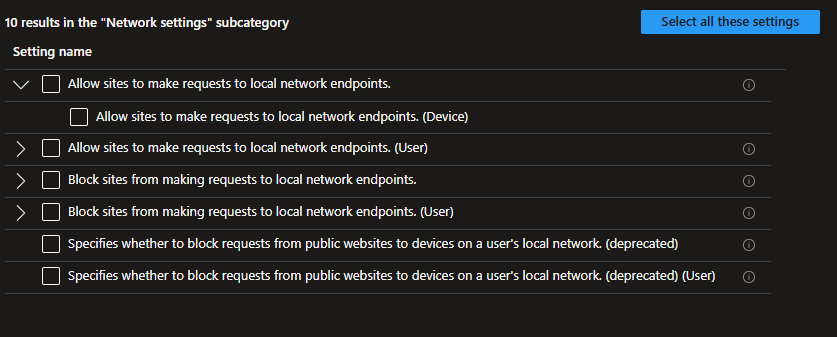
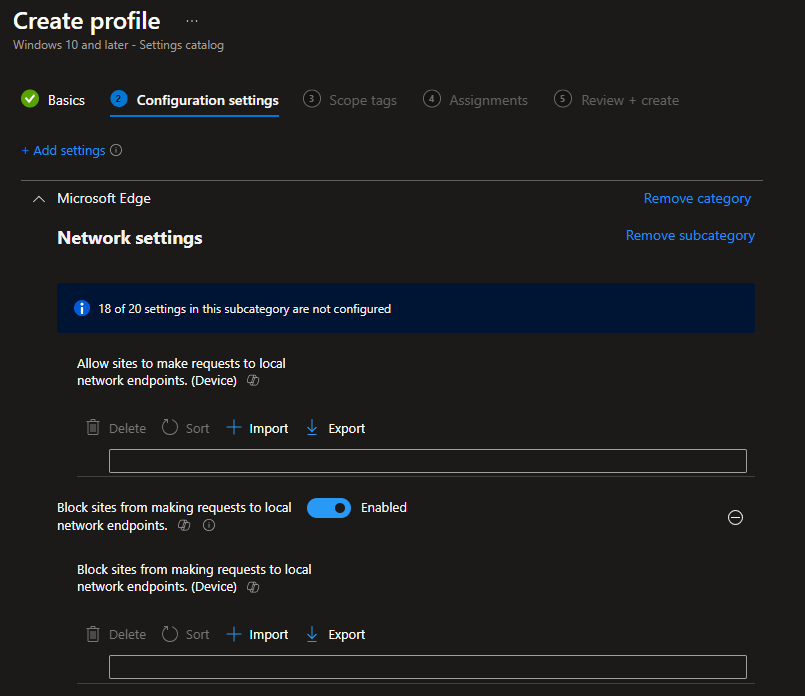
Use the Settings Catalog setting “Allow sites to make requests to local network endpoints” and “Block sites from making requests to local network endpoints” as needed and set the URLs.
This will address the LocalNetworkAccessAllowedForUrls CSP in the endpoint for the change.
✨More Reading
🔗GitHub Page for W3C Community Group Draft Report https://wicg.github.io/local-network-access/
🔗Edge Release notes: https://learn.microsoft.com/en-us/microsoft-edge/web-platform/release-notes/143#local-network-access-from-non-secure-contexts
🔗Chrome release notes: https://developer.chrome.com/blog/local-network-access and https://chromestatus.com/feature/5152728072060928
Discover more from EMS Route
Subscribe to get the latest posts sent to your email.
 EMS Route