Local Admin Password Solution has come a long way and the March 2025 Update (Service release 2503) had some good enhancements for the solution. Randomizing the LAPS username is one of them. Rather than enabling the local Administrator account or creating a special admin account for LAPS, having an auto randomizing username sounds confusing to an advisory.
- LAPS Account Protection From Tampering
- These are the new updates
- New options in settings
- How to configure the new settings in the LAPS policy?
- Results
- Wrapping Up
LAPS Account Protection From Tampering
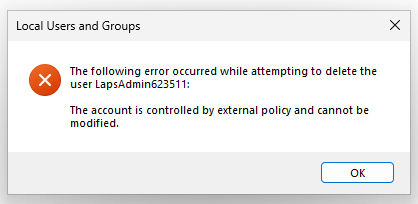
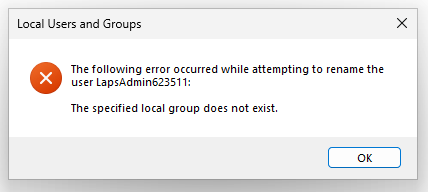
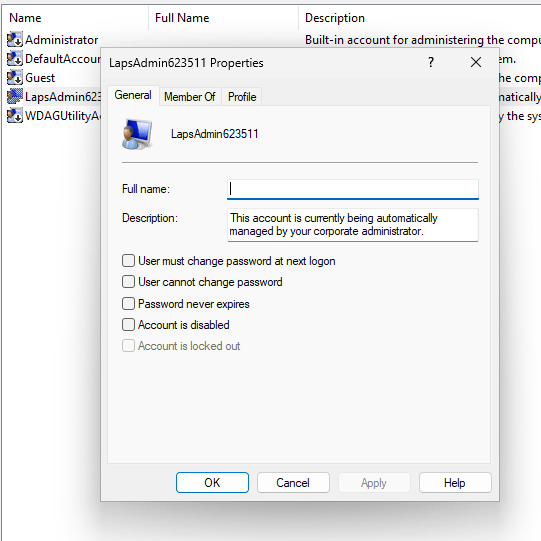
Account Protection from Deleting and Renaming is some good security on the LAPS account as you can see below.
These are the new updates
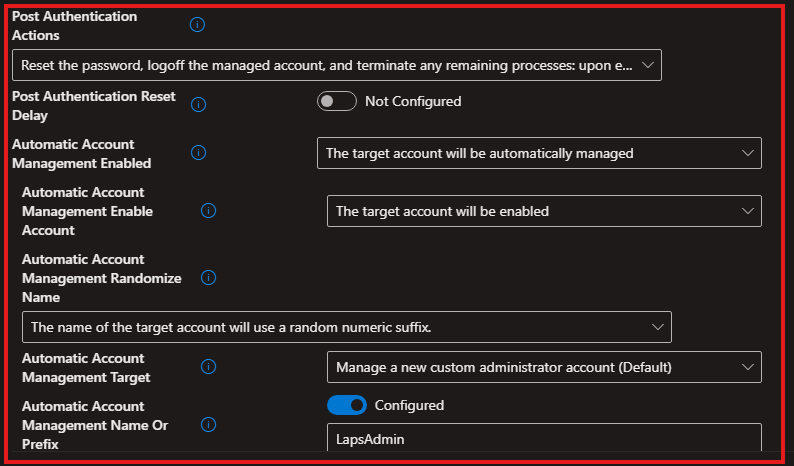
- Automatic Account Management Enable Account
Use this setting to configure whether the automatically managed account is enabled or disabled. If this setting is enabled, the target account will be enabled. If this setting is disabled, the target account will be disabled. If not specified, this setting defaults to False. - Automatic Account Management Enabled
Use this setting to specify whether automatic account management is enabled. If this setting is enabled, the target account will be automatically managed. If this setting is disabled, the target account will not be automatically managed. If not specified, this setting defaults to False. - Automatic Account Management Name Or Prefix
Use this setting to configure the name or prefix of the managed local administrator account. If specified, the value will be used as the name or name prefix of the managed account. If not specified, this setting will default to "WLapsAdmin".
- Automatic Account Management Randomize Name
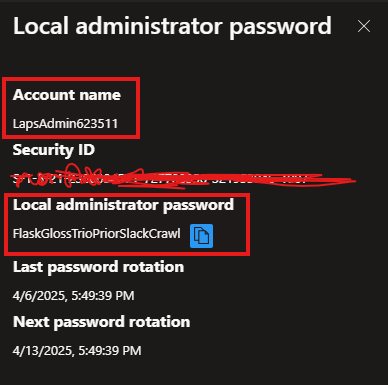
Use this setting to configure whether the name of the automatically managed account uses a random numeric suffix each time the password is rotated. If this setting is enabled, the name of the target account will use a random numeric suffix. If this setting is disabled, the name of the target account will not use a random numeric suffix.. If not specified, this setting defaults to False. - Automatic Account Management Target
Use this setting to configure which account is automatically managed. The allowable settings are: 0=The builtin administrator account will be managed. 1=A new account created by Windows LAPS will be managed. If not specified, this setting will default to 1. - Passphrase Length
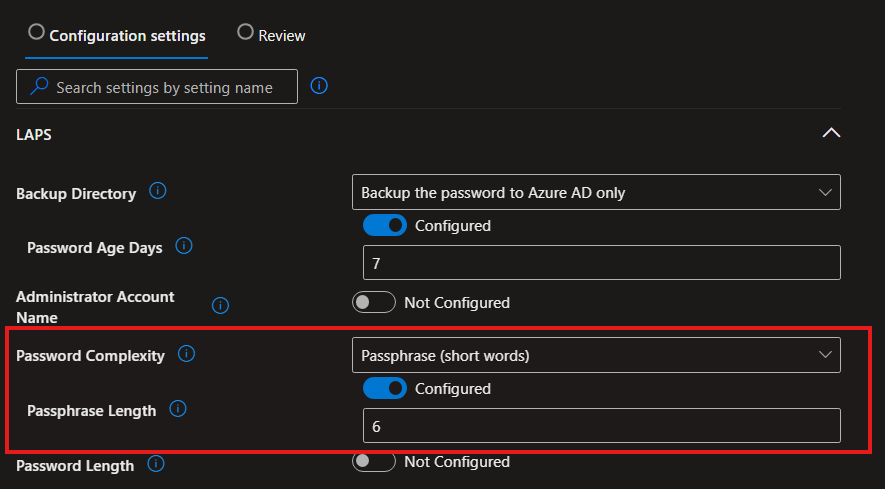
Use this setting to configure the number of passphrase words. If not specified, this setting will default to 6 words This setting has a minimum allowed value of 3 words. This setting has a maximum allowed value of 10 words.
Requirements to enable above settings?
| Scope | Editions | Applicable OS |
|---|---|---|
| ✅ Device ❌ User | ✅ Pro ✅ Enterprise ✅ Education ✅ IoT Enterprise / IoT Enterprise LTSC | ✅ Windows 11, version 24H2 [10.0.26100] and later |
New options in settings
- Password Complexity
- Passphrase (long words)
- Passphrase (short words)
- Passphrase (short words with unique prefixes)
- Post Authentication Actions
- Reset the password, logoff the managed account, and terminate any remaining processes: upon expiration of the grace period, the managed account password is reset, any interactive logon sessions using the managed account are logged off, and any remaining processes are terminated.
Requirements to enable the above settings?
| Scope | Editions | Applicable OS |
|---|---|---|
| ✅ Device ❌ User | ✅ Pro ✅ Enterprise ✅ Education ✅ IoT Enterprise / IoT Enterprise LTSC | ✅ [10.0.20348.1663] and later ✅ [10.0.25145] and later ✅ Windows 10, version 1809 [10.0.17763.4244] and later ✅ Windows 10, version 2004 [10.0.19041.2784] and later ✅ Windows 11, version 21H2 [10.0.22000.1754] and later ✅ Windows 11, version 22H2 [10.0.22621.1480] and later |
How to configure the new settings in the LAPS policy?
Prerequisites
To enable prerequists, check my previous blog post
Intune > Endpoint Security > Account protection> Create a profile
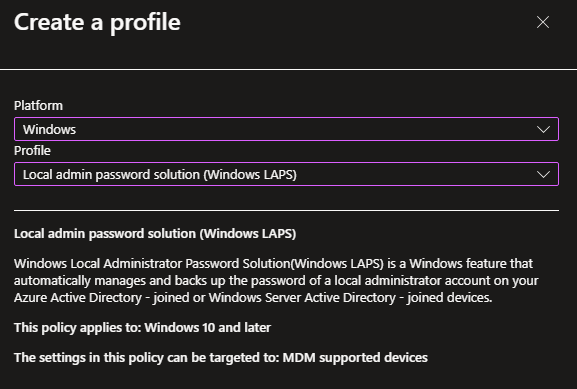

Post Authentication Reset Delay = Use this setting to specify the amount of time (in hours) to wait after an authentication before executing the specified post-authentication actions. If not specified, this setting will default to 24 hours. This setting has a minimum allowed value of 0 hours (this disables all post-authentication actions). This setting has a maximum allowed value of 24 hours.
Results
Wrapping Up
I can clearly see how LAPS account enhabcements can help protetct the Admin tasks on Windows endpoints without having to use the built-in local Administrator account or creating a special Admin account to manage LAPS.
Discover more from EMS Route
Subscribe to get the latest posts sent to your email.

