
Regardless the size of the organization. There is always one or few macros setup in excel files that does some tasks for the users. These macros are so critical to the business, and most of the time employees’ tasks are evolving around them.
And most of the time, people who create the macros in the organization are not there anymore and 10/10 times there’s no documentation.
Age old business processes = Can’t stop macro usage
Does that sound familiar? Let’s dive in
- Threat Actors Weaponizing Macros
- Some Well-known Techniques
- Examples from the Past
- Kill Chain 1: Malicious Payloads via Macros
- Kill Chain 2: Manipulating Legitimate Macros
- Some Real-World Attack Scenarios
- Using Defender’s Behavioral Monitoring
- Enabling Attack Surface Reduction Rules
- Disabling Macros – A Prescribed Method
- Ways to Configure Trusted Publishers/ Locations for Macros
- Wrapping Up
Threat Actors Weaponizing Macros
Advisories trying every way to get into organizations and using macros is on top of the list. Because they know the common pattern in organizations where they don’t have other options than using them in day-to-day work. From using social engineering to trick users to download an Excel file which has a malicious payload to manipulating macro-enabled files after getting initial access to exfiltrate data or perform other tasks, the possibilities can be endless.
Not all the businesses are willing to move to other methods or make their macros as signed macros, as that involves a significant change in the underling code or setting up a new software to support the same. This itself makes the threat actors more tempted and use this to perform actions your EDR can’t recognize. Probably because they seem harmless and not suspicious. This is basically weaponizing macros to perform something malicious.
🚩🚩Threat actors know the common pattern in organizations where they don’t have other options than using macros (legacy code or untrusted) in day-to-day work!
Some Well-known Techniques
Template Injection
This can be a devastating if done so. The attacker can inject the macro which has the malicious code into the Office templates. Whenever a user creates a file from these templates, it replicates and can widespread the infestation org-wide. And most of all, it can be hard to identify as these can stay in stealth mode and doing its job.
-ref: https://attack.mitre.org/techniques/T1221/
Living off the Land (LOtL)
Macros can be the entry point for such technique. It can all start with the macro being executed in a way that it will take access to legitimate processes and tools like PowerShell, WMI and Certificate Store, registry etc.
The issue with LOtL technique is that your macros are trusted because IT allows them to run regardless the state (trusted publisher or not) and the tools using to attack later are also trusted as they are legitimate processes and tools within the OS.
Examples from the Past
These are some examples which shows how the threat actors exploited macros and according to my understanding it has 2 main kill chains.
- APT28/Fancy Bear: used weaponized Microsoft Word documents abusing the remote template function to retrieve a malicious macro.
- Emotet: Security researchers from Microsoft identified a pivot in tactics from the Emotet campaign. The new tactics include attaching password-protected archive files (e.g., Zip files) to emails to bypass email security gateways. These email messages purport to deliver documents created on mobile devices to lure targeted users into enabling macros to “view” the documents—an action which actually enables the delivery of malware.
- TrickBot: TrickBot has used an email with an Excel sheet containing a malicious macro to deploy the malware.
Below are critical, and they both were possible because of macros. This essentially expands the attack surface and can be silently accessing/ transferring your valuable data.
Kill Chain 1: Malicious Payloads via Macros
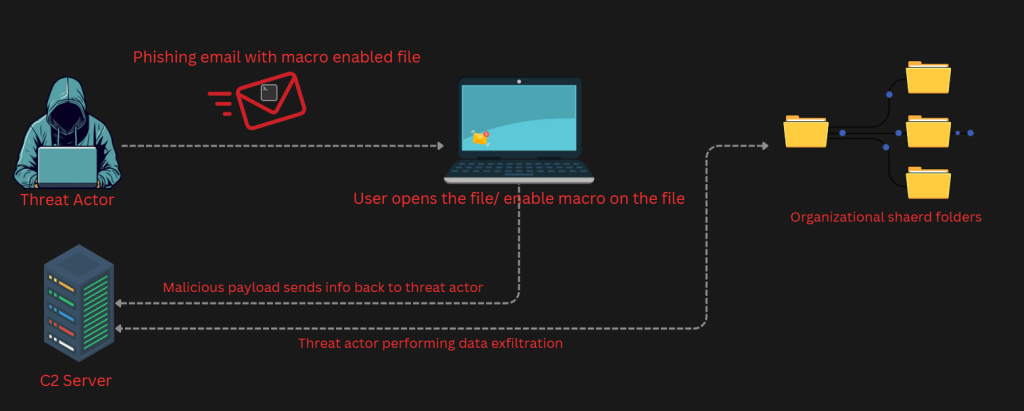
After threat actor preforming recon, a phishing email with a macro-enabled Excel file to be sent to the targeted users (eg: Finance/ Accounting) and once they open the file and enable macros (if there is a warning to enable) this will be activated and will send back the info to the threat actor (given how the macro is constructed). Once they have the required data, or a possible malware downloaded on to the computer, or credential dumping etc.
Or simply the phishing email attachment which has the macro can be used for the recon stage.
Kill Chain 2: Manipulating Legitimate Macros
Imagine the threat actor is already inside your network. This can be via stolen credentials, social engineering etc. Once they are in, if their motive is to look for financial information, macros can be a good tool. They can easily manipulate a trusted or an untrusted but a legitimate macro to fulfil their purpose. It can be simple as adding another line in the macro code to look for files and send content back to the threat actor. These can be used to achieve various tasks.
Some Real-World Attack Scenarios
When the advisories spend time in the network, probably in a dormant way until they learn what they want to know about the organization, they will start their next steps. Below are some examples, but this can be changed depending on where and what you have macros on. Bottom-line is macros are able to do tasks for you. As same as for the advisory as well.
| Example Target | Legitimate Macro | Macro Manipulation | Result |
| Finance Department | Processes invoices, sends to accounting | Copies all invoice data to attacker-controlled server | Continuous financial data theft without detection |
| HR Department | Updates employee records | Harvests personal information (drivers license, addresses, salaries) | Identity theft goldmine |
| Executive reporting | Weekly dashboard update | Leaks strategic business information | Corporate espionage |
Using Defender’s Behavioral Monitoring
Having an EDR or XDR that is intelligent enough to perform Behavioral Monitoring is important. This shows having an “Anti-Virus” is not enough, and the solution must have the necessary “bells and whistles” to be proactive in these types of events.
Malicious Signatures and hashes detection is done with the known malware patterns, but behavior monitoring goes one step further to understand the processes, activities in real-time.
This is a critical proactive measure which you can enable in the environment as the first step of securing the endpoints.
Behavioral Monitoring leads to blocking of the malicious artifact and containment of the endpoint. Using Defender’s ML based activities, it can filter out a malicious activity from a standard process runs on endpoints which then be blocked and contain the device for further analysis.
Feedback Loop Detection
Attackers understand what’s blocked during their initial activities. This helps them to try other ways to get in. Defender has Feedback Loop blocking by default, and that suspicious activity will be alerted by Defender for Endpoint’s rapid protection feature.
Check your environment Now!
Run below PowerShell command to understand the status of the Behavior Monitoring on the endpoint.
Get-MpComputerStatus | Format-Table BehaviorMonitorEnabled
KQL to understand the behavior (from MS Learn)
let EvalTable = DeviceTvmSecureConfigurationAssessment
| where ConfigurationId in ("scid-91")
| summarize arg_max(Timestamp,IsCompliant, IsApplicable) by DeviceId, ConfigurationId,tostring(Context)
| extend Test = case(
ConfigurationId == "scid-91" , "BehaviorMonitoring",
"N/A"),
Result = case(IsApplicable == 0,"N/A",IsCompliant == 1 , "Enabled", "Disabled")
| extend packed = pack(Test,Result)
| summarize Tests = make_bag(packed) by DeviceId
| evaluate bag_unpack(Tests);
let DefUpdate = DeviceTvmSecureConfigurationAssessment
| where ConfigurationId == "scid-2011"
// | where isnotnull(Context)
| extend Definition = parse_json(Context[0][0])
| extend LastUpdated = parse_json(Context[0][2])
| project DeviceId,Definition,LastUpdated;
let DeviceInformation = DeviceInfo
| where isnotempty(OSPlatform)
| summarize arg_max(Timestamp,*) by DeviceId, DeviceName
| project DeviceId, DeviceName, MachineGroup;
let withNames = EvalTable
| join kind = inner DeviceInformation on DeviceId
| project-away DeviceId1
| project-reorder DeviceName, MachineGroup;
withNames | join kind = fullouter DefUpdate on DeviceId
| project-away DeviceId1
| sort by BehaviorMonitoring asc
Enabling Attack Surface Reduction Rules
What we discussed above can be identified and blocked using policies. In this case using Attack Surface Reduction Rules. However changing status of the rules to Blocked mode can affect the user productivity. Test the behaviour for a set of users first along with the Defender reports and then move to the blocked mode.
Below is an extraction from MS Learn pages which has explained the rules reference
Rule: Block JavaScript or VBScript from launching downloaded executable content
GUID: d3e037e1-3eb8-44c8-a917-57927947596d
What this does? This rule prevents scripts from launching potentially malicious downloaded content. Malware written in JavaScript or VBScript often acts as a downloader to fetch and launch other malware from the Internet. Although not common, line-of-business applications sometimes use scripts to download and launch installers.
Rule: Block Office applications from creating executable content
GUID: 3b576869-a4ec-4529-8536-b80a7769e899
What this does? This rule prevents Office apps, including Word, Excel, and PowerPoint, from creating potentially malicious executable content, by blocking malicious code from being written to disk. Malware that abuses Office as a vector might attempt to break out of Office and save malicious components to disk. These malicious components would survive a computer reboot and persist on the system. Therefore, this rule defends against a common persistence technique. This rule also blocks execution of untrusted files that might have been saved by Office macros that are allowed to run in Office files.
Rule: Block Win32 API calls from Office macros
GUID: 92e97fa1-2edf-4476-bdd6-9dd0b4dddc7b
What this does? This rule prevents VBA macros from calling Win32 APIs. Office VBA enables Win32 API calls. Malware can abuse this capability, such as calling Win32 APIs to launch malicious shellcode without writing anything directly to disk. Most organizations don’t rely on the ability to call Win32 APIs in their day-to-day functioning, even if they use macros in other ways.
Disabling Macros – A Prescribed Method
While the Attack Surface Reduction Rules helps you to block suspicious activities carried out by the macros, disabling macros altogether is recommended and a well-documented process. However, exceptions can be done in some cases with a trusted macro publisher.
Microsoft Intune has a lot of controls to block macros and setting up Office Apps trust venter settings. It can be from the Settings Catalog, AV settings, ASR etc etc. Your experience can be an overwhelming one.
ISM Controls
| ISM control Mar 2025 | Control | Measure |
|---|---|---|
| 1674 | Only Microsoft Office macros running from within a sandboxed environment, a Trusted Location or that are digitally signed by a Trusted Publisher are allowed to execute. | For each Office app, the following setting has been configured (via the Macros Enabled for Trusted Publishers policy): Disable all except digitally signed macros: Enabled |
| 1487 | Only privileged users responsible for checking that Microsoft Office macros are free of malicious code can write to and modify content within Trusted Locations. | Not applicable. Only macros signed by a Trusted Publisher are allowed to execute for select users. |
| 1890 | Microsoft Office macros are checked to ensure they’re free of malicious code before being digitally signed or placed within Trusted Locations. | An administrator launches macros on a device that has the ACSC Office Hardening policies applied, that is disconnected from the production environment and dedicated for the purpose of determining the safety of the macros prior to signing. |
If you are Australia, adhering to Essential 8 is not something new. Australian Signals Directorate has guidance which can be used as a standard process to block macros even if you are not operating from Australia as the configuration is rather universal.
What this guide helps you to achieve?
| Control | Measure |
|---|---|
| Microsoft Office macros in files originating from the internet are blocked. | For each Office application, the following policy has been configured (via theACSC Office Hardening policy): Block macros from running in Office files from the internet: Enabled |
| Microsoft Office macros digitally signed by an untrusted publisher can’t be enabled via the Message Bar or Backstage View. | For each Office application, the following policy has been configured (via the ACSC Office Hardening policy): Disable Trust Bar Notification for unsigned application: Enabled |
| Microsoft Office macro antivirus scanning is enabled. | The following policies have been configured (via the ACSC Office Hardening Guidelines policy): Force Runtime AV Scan: Enabled Macro Runtime Scan Scope: Enabled for all documents Note: This requires Windows Defender to be running on the device. |
| Microsoft Office macros are blocked from making Win32 API calls. | The following Attack Surface reduction rule has been configured (via the ASR policy): Block Win32 API calls from Office macro (92E97FA1-2EDF-4476-BDD6-9DD0B4DDDC7B) |
| Microsoft Office macros are disabled for users that don’t have a demonstrated business requirement. | All Office users by default are targeted with a policy that blocks the execution of macros (policies differ per Office application): Disable VBA for Office applications: Enabled |
| Microsoft Office macro security settings can’t be changed by users. | Policies configured and deployed via Intune can’t be changed by standard users. The policies for hardening Office and disabling macros aren’t able to be changed by end users. Ensure users that are exempted from the Block macros policy are targeted with a policy that only allows the running of macros from a trusted publisher. |
Ways to Configure Trusted Publishers/ Locations for Macros
If you still need to allow macros for users for certain tasks, it is important you have a process in place for this. Setting up Trusted Publishers for Macros is a good practice as this will not untrusted macros to run on endpoints.
A few things to ask when validating Trusted Publishers
- Is still required for macros in use in your organization.
- Is still within its validity period.
- Still has a valid chain of trust.
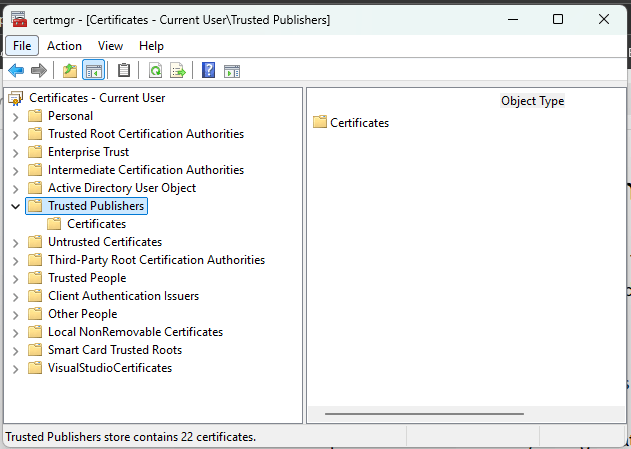
Ther are two main ways where you can set this. Adding a Code signing Certificate for the Trusted Publishers or Setting up a Trusted Location and add the un-signed yet legitimate macros there.
Use Microsoft Intune to add the Certificate to Trusted Publishers.
Using Trusted Locations
This is also a valid way of securing the macros. However, you have to make sure only the privileged users have access to the trusted location as this can contain unsigned yet legitimate macros.
- Use policy to prevent users from creating Trusted Locations
- Use policy to centrally manage Trusted Locations
- Determine the office apps you need to configure Trusted Locations
Wrapping Up
Managing and securing or blocking macros are a well thought out process and will show you how much legacy remnants of coding and scripting still running in your environment and how most of the critical tasks are depending on them. Change management will play a huge role here as it should be a balance between productivity and security.
Again, this is a very prominent attack vector because Age old business processes = Can’t stop macro usage.
Time to act is now!
Discover more from EMS Route
Subscribe to get the latest posts sent to your email.
 EMS Route