I’ve been doing a lot of research into Microsoft’s new Global Secure Access recently as most of the features have gone on General Availability. Entra Private Access caught my eye. However, before discussing the feature, it is wise to discuss about the underlying technology that Entra Private Access uses and then jump on to it.
We all know the Zero Trust principles. Assume Breach, Verify Explicitly, and Use the Least Privilege Access. We always make sure the Zero Trust principles are met when a user is connecting to a system or an app that is mainly identity-aware. You will have touchpoints like are they using MFA? Are they elevating only the required access, are Identity Protection policies in place, etc.
- Zero-Trust Network Access (ZTNA)
- Challenge with Non-Identity Aware Apps and Services
- Entra App Proxy to Connect Web Apps, But the Problem Still Stands
- What if the Apps and Services are Not Identity-Aware?
- Traditional VPN
- Why ZTNA is Better Than the Traditional VPN?
- Entra Private Access
- Entra ID Security Features
- Wrapping Up
Zero-Trust Network Access (ZTNA)
In a corporate network when you are required to connect to a local resource (Example: RDP), you provide the username and the password and if you are allowed to access the resource, then the authentication will be successful. The same goes for an SMB share. Depending on the access levels, you will be connected to the file share. Did the identity provider (Entra ID) log this sign-in? Was there a prompt to verify your access with MFA? Guess not. This is because the service and the network that the service is on are not identity-aware. This can pose a huge threat because the above-mentioned Zero-Trust Principles are not met.
Enter ZTNA or Zero Trust Network Access. This provides an additional security layer on top of the standard app access. Once this is properly configured, when you are trying to access an on-premises service, it senses and pushes the necessary controls before accessing the service.
Challenge with Non-Identity Aware Apps and Services
Insider threats are not a new threat vector these days. It can happen at any time, from anywhere! How secure your local resources are? How secure are your applications? Do you have a strategy to secure your “non-identity-aware services and apps? a highly confidential Shared Drive perhaps?” Do you have time limitations on accessing those resources? Do you have a way to get the user to access the published internal resources as a package and someone to approve it without having to get it granted as soon as the user account is created?
Entra App Proxy to Connect Web Apps, But the Problem Still Stands
This is something we all know and may be using at the moment. Your corporate web app that is not a SaaS app or cannot be integrated with Entra ID can utilize the App Proxy feature and it will you to register the app in Entra ID and use the Entra ID features.
While this is the way for web apps the problem (partially) still stands. How do you want to provide access to your other systems which are not web apps, and which are not identity-aware? Maybe it is an on-prem Server that is domain joined that you need to provide access to or SSH into a service or access good ol’ SMB shares.
What if the Apps and Services are Not Identity-Aware?
Everything that I mentioned earlier will work with Zero-Trust if it’s identity-aware. Meaning, that the application is registered in Entra ID, and it will investigate all the signals that are passing through. There are apps and services in the local environment that are not identity-aware. Yes, they are using your local AD authentication, but no controls are enforced.
If you are accessing your corporate network from a traditional VPN, after establishing the VPN connection, how would you determine their access patterns and per-app auditing and capabilities like that?
Simply there is a barrier of technology as you are unable to see what’s going on.
Enhanced identity-centric security controls for all private applications. With Private Access, you can create Conditional Access policies and multi-factor authentication (MFA) that require modern authentication for accessing any private application, even those using legacy protocols such as Kerberos and NT LAN Manager (NTLM). This brings policies based on the sensitivity of the application, level of user risk, network compliance, and so forth to legacy applications. For example, you can easily require multi-factor authentication (MFA) and device compliance checks for users trying to access remote desktop (RDP), secure shell (SSH) or SMB applications.
Traditional VPN
It is a brainer that organizations use VPNs so their users can log in to the corporate network seamlessly from anywhere and this has been proven to work for ages. In an era where Identity is the new firewall, the traditional VPN situation shows how risky it is to provide wildcard access when the connection is established. Yes, they are performing MFA during the authentication, but that’s all and that is a concern.
Why ZTNA is Better Than the Traditional VPN?
❌A traditional VPN is working at layer 3, the Network layer and it can’t push enforcement and restrictions for identity.
✅ZTNA is working at the Application layer (Layer 7) which opens up a lot of possibilities when it comes to different enforcements and auditing and combining with other features.
❌A traditional VPN needs to be set on-premises or connected to the corporate network with complex configs.
✅ZTNA is working with the Cloud identity and when it comes to Entra Secure Global Access, all you need is a very light-weight client on the service and an easy-to-understand config, and the knowledge on the Entra ID features
✅ZTNA and Entra Private Access specifically provide the per-app segmentations that give you granularity when it comes to enforcing different topologies.
❌A traditional VPN will still use MFA during the authentication process; however, it will then open up access to the whole network. Simply put, the Zero-Trust principles will not be in play once the VPN is established.
✅ ZTNA can use the relevant Identity and Access management solutions to provide adaptive access to resources as opposed to wildcard access provided by traditional VPNs.
Entra Private Access
Now that we know what ZTNA is and how this can change how access controls work, let’s look at Entra Private Access. This Microsoft’s Secure Service Edge (SSE) solution that is built on Zero Trust principles. This comes under the Global Secure Access section in the Entra portal. The purpose of this article is to get you ready and help you in planning and giving an understanding of the technology.
Microsoft’s identity-centric Security Service Edge solution converges network, identity, and endpoint access controls so that you can secure access to any app or resource, from any location, device, or identity. It enables and orchestrates access policy management for employees, business partners, and digital workloads. You can continuously monitor and adjust user access in real time if permissions or risk level changes to your private apps, SaaS apps, and Microsoft endpoints.
Licensing
At the time of writing, this comes with Entra ID Premium P1, Entra ID Premium P2 or with The Microsoft Entra Suite.
App Proxy is Now Private Network Connectors
App proxies were mainly used to connect to the Web Apps that are not Entra ID aware and previously there were no options to integrate the non-web apps. The new Private Network Connector will take care of both web apps and non-web apps when passing the requests to Secure Service Edge for access.
- The private connector is a lightweight agent that is installed on a Windows server that has access to the backend of the system/ app and sends only outbound traffic (80 and 443 and required URLs) to the application proxy service in the cloud and Entra Secure Service Edge.
- You will require a connector or a connector group per network if all the apps and services you need to access is not in the same network.
- Depending on the app’s HA requirements, you will need to set up connector groups to facilitate the connection.
- The connector should be able to communicate with the Web apps and Non-Web apps when installed on the Windows server
- Users connect to the application proxy cloud service that routes their traffic to the apps via the connectors.
Traffic Forwarding Profile and The Global Secure Access Client (GSA Client)
When the traffic forwarding profile is set for Private Access, the GSA client will get the relevant traffic forwarding info as well as the apps and the IP segments configured. So, it knows which traffic to intercept and send to Entra SSE. When the user is in the corporate network even when they try to ping the resources (eg: RDP which is now controlled via Private Access) will not get any reply as the traffic is now routed to the cloud.
Entra Private Access Process in a Nutshell
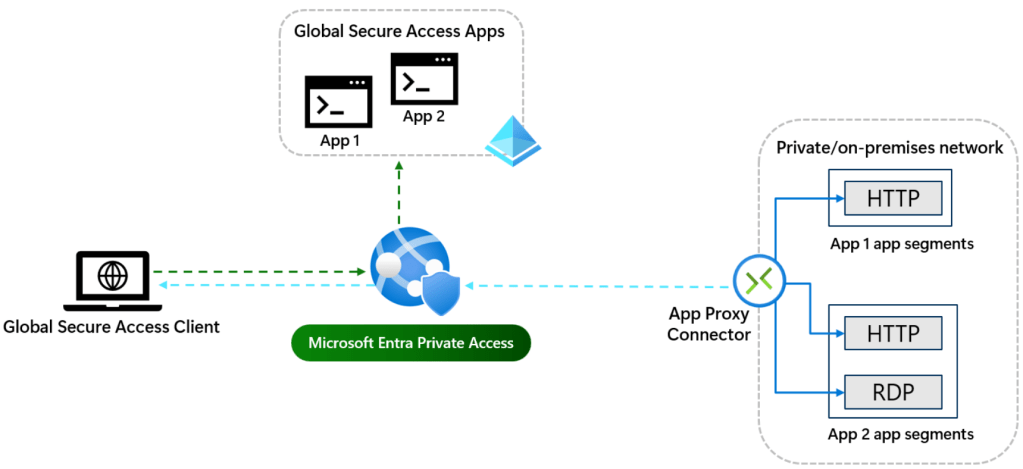
- Users trying to access the on-premises application or the service.
- Users’s traffic will be routed to Entra Private Access for security posture and conditional Access evaluation
- Once the authentication is successful, the app proxy service will communicate with the App Proxy Connector
- App proxy connector to communicate with the DC to request the Kerberos ticket and the DC will send the ticket back to the App proxy connector
- Ticket will be sent back to the App proxy service and back to the user
- User accesses the service
Intelligent local access. Employees need a consistent security posture whether they’re accessing private applications remotely or on-premises. The intelligent local access capability enables fast and seamless ZTNA for users, whether they’re within the corporate network or connecting remotely from anywhere outside corporate network boundaries. For example, a user while on the corporate network can connect to on-premises private applications such as RDP or SMB while CA policies such as MFA are still enforced, and application traffic remains local on the corporate network.
Access Topologies
There are a couple of challenges that are resolved by Entra Private Access
- Access local resources from a domain-joined device from local or remote
- Access to local resources from an Entra ID Joined device from locally or remote
- Access to local resources from a mobile client
Entra Private Access Topology – Accessing resources connected to the AD environment locally

- User tries to access the resource >
- It requires authentication >
- Direct access to the resource is intercepted by the Global Secure Access Client
Global SSE Client routes the traffic to Azure SSE. - User is now prompted with MFA (Conditional Access is evaluated depending on the application the user is accessing as they are defined in Entra ID) >
- Then the Kerberos request will be sent from Entra ID to the DC via the Private Network Connector >
- DC to issue the Kerberos ticket
- The issued ticket will be sent back to the user via Network connector to Entra ID to the user device
- Use logs in to the on-premises resource
I will be writing about other scenarios in upcoming blog posts.
Per-App Segmentation
Instead of granting remote users access to your entire network, as traditional VPNs do, you can define granular segmented access policies for each application or group of applications based on user, device, or processes running on the endpoint.
Entra ID Security Features
Now that you have an understanding of how Entra Private Access works, one of the major parts of it is to combine with the Entra ID features. Conditional Access policies, Identity Protection, and Identity Governance. These controls will stop lateral movement as the proper checks are in place before someone accesses the resources as opposed to wildcard access without any modern controls.
Because the apps are defined as “Enterprise Apps” within Global Secure Access, they are visible in Entra ID Enterprise Apps section as well. This opens up all possible avenues when it comes to pushing the necessary security controls.
A Few Security Controls
- Strong Auth methods when accessing some SMB shares or RDP’ing to critical servers or Domain Controllers.
- Add the groups for apps and set up PIM for groups where the members in it will get Just-in-time access with other controls set up.
- Enforce Authenticator and not legacy methods like text when completing the MFA challenge.
- Enabling risk-based conditional access policies when accessing these apps.
- Enabling Continues Access Evaluation to make sure when the user’s location changes, apply certain checks like enforcing MFA.
- Device security posture evaluation with Device Compliance policies in Intune and marrying that with Conditional Access policies.
- Add the groups for the apps and set up Entitlement Management to capture those accounts so the user has to request access and will go through an approval process if and when they need to access the resources which are not always available by default.
These are just to name a few. This means you can control your non-identity-aware app access with the power of Entra ID zero-trust principles and implement more identity-centric controls going forward.
Entra ID Sign-in Logs
Logs can be ported to Azure Log Analytics if needed which allows you to use the power of KQL to run through and render it as you need to get a better understanding of the sign-ins. Also creating workbooks within Log Analytics is a great way to be up to date with sign-ins to make sure you are aware of what’s happening in the identity environment.
Wrapping Up
ZTNA is the successor of the traditional VPN and that’s no doubt and that opens up to a plethora of capabilities in Entra ID which has already proven to secure the identity environment.
Of course, planning to move from a VPN to a more modern solution like this will not happen overnight, I hope this article will help you to understand more about the product and the features and add it to your security roadmap.
Discover more from EMS Route
Subscribe to get the latest posts sent to your email.
 EMS Route